Your ERP has more than one version of the truth

Finance says:

“That’s not how the process works.”

IT says:

“That’s exactly how the system is configured.”

The implementation partner says:

“That’s what was signed off.”

QA says:

“That’s what the test case says.”


Somewhere between those four answers is the process actually running in production.

Which version of the business are you testing?

An ERP test case can be technically correct.

And still be testing the wrong thing.

Because over time, something happens to every ERP.


  • The documented process changes.
  • A workaround becomes permanent.
  • A configuration gets adjusted.
  • A customisation is added.
  • Someone builds an Excel step outside the system.
  • A team starts doing something differently because that’s how they’ve always done it.


Eventually, you have four versions of the same process:


  • The documented process.
  • The configured process.
  • The tested process.
  • The process people actually follow.


Over time, those versions can drift further apart.

What I’d actually check

Not the test script.

The gap next to it.

I’d sit with the person who runs the transaction every day and watch them do it, not describe it.

I’d compare that against the configuration as it exists today, not as it was signed off at go-live.

And I’d ask:

When was the test case last updated?

Then:

When did the process last change?

Those two dates can tell you a lot about which version QA has actually been testing.

Most of the time, the answer isn’t that any of the four voices is wrong.

IT is right about the configuration.

QA is right about the test case.

The process owner is right about what they do.

They’re each accurately describing a different snapshot in time.

Why it matters

QA can execute every test successfully.

Automation can show green.

UAT can be signed off.

And production can still surprise everyone.

Not because nobody tested.

Because everyone tested a different version of the business.


So here’s the question:

Which version of your process would survive someone actually watching it get run?

34 mandatory features. 19 in one place.

Where should your five-day validation window go first?

Last edition, we looked at the gap between sandbox validation and production — a window of only seven calendar days under Microsoft’s One Version update model.

This edition answers the more practical question:

When the window is that short, where should you spend it?

For 10.0.49, Microsoft’s release documentation gives us an important clue.

The mandatory changes aren’t evenly distributed.

And that matters.


The number that should shape your test plan

Dynamics 365 Finance 10.0.49 includes 34 features that become mandatory — features that remain in Feature Management but can no longer be turned off.

But the total isn’t the most useful number.

The distribution is.

19 of those 34 mandatory features are in Cash and Bank Management.

That’s more than half of the mandatory changes concentrated in one functional area.

And Cash & Bank isn’t isolated from the rest of the finance operation.

It touches reconciliation. Payment processing. Exchange rates. Bank transaction posting. Clearing and settlement.

That’s not a reason to test everything in Cash & Bank and ignore everything else.

It’s a reason to start where the change is concentrated.


Concentrated change calls for concentrated testing

Imagine the mandatory changes were spread evenly across twenty modules.

A broad regression strategy would make sense.

But that’s not what 10.0.49 looks like.

When a large proportion of mandatory change sits in one area, giving every module identical testing effort can actually work against you.

You have a limited validation window.

So the question isn’t:

“How much can we test?”

It’s:

“Where does additional testing reduce the most business risk?”

That changes how the test plan gets built.

Go deeper where the change is concentrated.

Test proportionally where it isn’t.


What the 19 Cash & Bank changes actually touch

Looking across Microsoft’s mandatory-feature list, five process areas stand out.

01 · Bank reconciliation

Changes to advanced bank reconciliation, matching and posting behaviour.

If your month-end close depends on reconciliation running cleanly, this deserves early attention.

02 · Payment processing

Changes affecting payment journals, postdated cheques and settlement mechanics.

These aren’t necessarily dramatic changes.

But a small change in payment behaviour can have a very real operational consequence.

03 · Exchange-rate handling

Changes affecting how exchange rates are applied when bank transactions are posted.

For organisations operating across currencies, that’s more than a technical detail.

A different rate at a different point in the process can produce a different number.

04 · Bank transaction posting

Changes to posting behaviour within the reconciliation framework.

The question isn’t simply whether the transaction posts.

It’s whether it posts the way the business expects it to.

05 · Clearing and settlement

Changes around bridged-transaction clearing and cleared-date handling.

Again, the risk isn’t necessarily a visible failure.

It can be a process that technically completes while producing an outcome nobody expected.


The risk isn’t always an error

This is where release testing gets interesting.

A failed test is easy to recognise.

A reconciliation that matches differently isn’t.

An exchange rate applied at a different point doesn’t necessarily generate an error.

A settlement process can complete successfully while producing a number that looks perfectly reasonable.

Until month-end.

Until the numbers don’t reconcile.

Until someone asks why the ledger doesn’t tie.

Until an issue appears in an audit.

That’s why “does it work?” isn’t enough.

The better question is:

“Does the business process still produce the right outcome?”


The question that should drive the test plan

So the useful question was never:

“How many mandatory features are in 10.0.49?”

It’s:

“Which of them touch a process we can’t afford to get wrong?”

For one organisation, several of the 19 Cash & Bank changes may be material.

For another, only two or three may deserve deep validation.

That difference is important.

Because release readiness isn’t about applying the same test depth everywhere.

It’s about understanding where the business is exposed.

Before the sandbox updates, ask:

  • Which processes drive month-end close?
  • Which feed statutory reporting?
  • Which depend on integrations?
  • Which involve financial controls?
  • Which errors would be difficult to detect until after production?

Map the mandatory changes against those processes.

Now your validation window has a purpose.


One compliance item that deserves its own workstream

Cash & Bank isn’t the only area worth attention.

For organisations with French reporting obligations, 10.0.49 also brings France e-reporting into the release conversation.

This shouldn’t be treated as simply another feature on a regression checklist.

It’s part of a regulatory requirement with its own timeline and business implications.

For affected organisations, it deserves its own workstream:

understand the requirement → validate the configuration → test the relevant business flows → confirm the reporting outcome.


The bottom line

Most release testing asks:

“Did the feature still work?”

Very little testing asks:

“Did the business process still produce the right result?”

10.0.49 makes the distinction particularly clear.

34 mandatory features. 19 concentrated in Cash & Bank.

You don’t need to test all of them equally.

You need to know which ones can hurt your business — and spend your validation window there.


Need help deciding where to focus?

Crestech’s D365 F&O readiness assessment maps the mandatory 10.0.49 changes against the business processes your organisation depends on, helping identify where deeper validation is warranted before production.

Who Signs Off When the System Starts Making Decisions?

Last edition, we asked a governance question many organisations struggle to answer:

Who signed off on the risk in your last D365 release?

Microsoft’s latest Dynamics 365 release wave doesn’t replace that question.

It expands it.

Across Finance & Operations, Microsoft is introducing more agentic capabilities—AI experiences that can coordinate work, initiate business tasks and assist users with progressively less manual intervention, depending on how organisations configure governance and approval policies.

For an ERP platform that underpins finance, procurement and operations, this isn’t simply another feature release.

It changes how decisions are made—and, more importantly, how those decisions are governed.


When Decision-Making Changes, Governance Has to Change Too

Think back to the three questions from Edition 13.

Now ask them again—but this time, imagine part of the workflow is initiated by an AI agent rather than a person.

What changed—in business terms?

A traditional release introduces planned functionality.

An agent-enabled process can introduce different operational outcomes depending on the context in which decisions are made.

Understanding what changed is no longer enough.

Organisations increasingly need to understand how decisions are reached.


Who owns the risk if something goes wrong?

When people make decisions, accountability is usually clear.

When an AI agent initiates an action, accountability depends entirely on the governance model surrounding it.

Who configured the agent?

Who defined its authority?

Who approved those boundaries?

Without clear ownership, “Who approved this?” can quickly become a difficult question to answer.


What evidence proves the business is protected?

Traditional regression testing tells you whether software behaved as expected.

It doesn’t explain why an autonomous agent chose a particular action—or whether that decision remained within the business rules your organisation intended.

As enterprise AI adoption grows, observability, traceability and auditability are becoming essential—not optional—for organisations operating regulated or business-critical processes.

Crestech Perspective

We don’t believe the answer is resisting agentic AI.

Microsoft is clearly investing in this direction, and the potential productivity benefits are significant.

The challenge is making sure governance evolves alongside capability.

That means extending release assurance into something broader.

Release Assurance must evolve into Decision Assurance.

Before an AI agent is trusted with a business-critical process, organisations should be able to answer three simple questions:

  • What decisions is the agent authorised to make?
  • What business rules govern those decisions?
  • What evidence exists to demonstrate that those rules were followed?

Those answers should exist before production—not after an incident.


Final Thought

Edition 13 asked whether your leadership team could explain what changed and why it was safe.

This edition asks a different question.

What if one of the most important business decisions wasn’t made by a person at all?

Would you still be able to explain what happened?

Would you know who approved it?

Would you have the evidence to prove it?

If those questions don’t yet have clear answers, now is the time to start the conversation.

Go-live is a date on the calendar. Release readiness is a decision you earn.

We have been in more go-live planning meetings than We can count.

And in almost every one, the conversation follows the same pattern.

Someone asks: when do we go live?

A date is given. Usually one that was decided months ago, before a single test had run.

Then the meeting moves on.

Nobody asks the harder question: how will we know when we are actually ready?

That question — and the absence of a real answer — is responsible for more painful D365 go-lives than any technical problem I have encountered.

This edition of CrestCode is about the difference between having a go-live date and having a release readiness framework. And why only one of those things protects the business.


The problem most teams do not see until it is too late

aaa

Every D365 programme has a go-live date. It is in the project plan, in the steering committee slides, and in the email the CIO sent to the board six months ago.

What most programmes do not have is a structured answer to a different question: on what basis will we decide that the system is ready to support live business operations?

UAT passing is not that answer. UAT answers a different question entirely — can users execute today’s business processes in the new system? It does not answer whether those processes will continue to work after the next Wave update, after a new customisation goes in, or after the data migration surfaces an edge case nobody thought to test.

The teams that go live confidently are not the ones with the most test cases. They are the ones who built a release readiness framework before testing started — and ran every release decision against it.


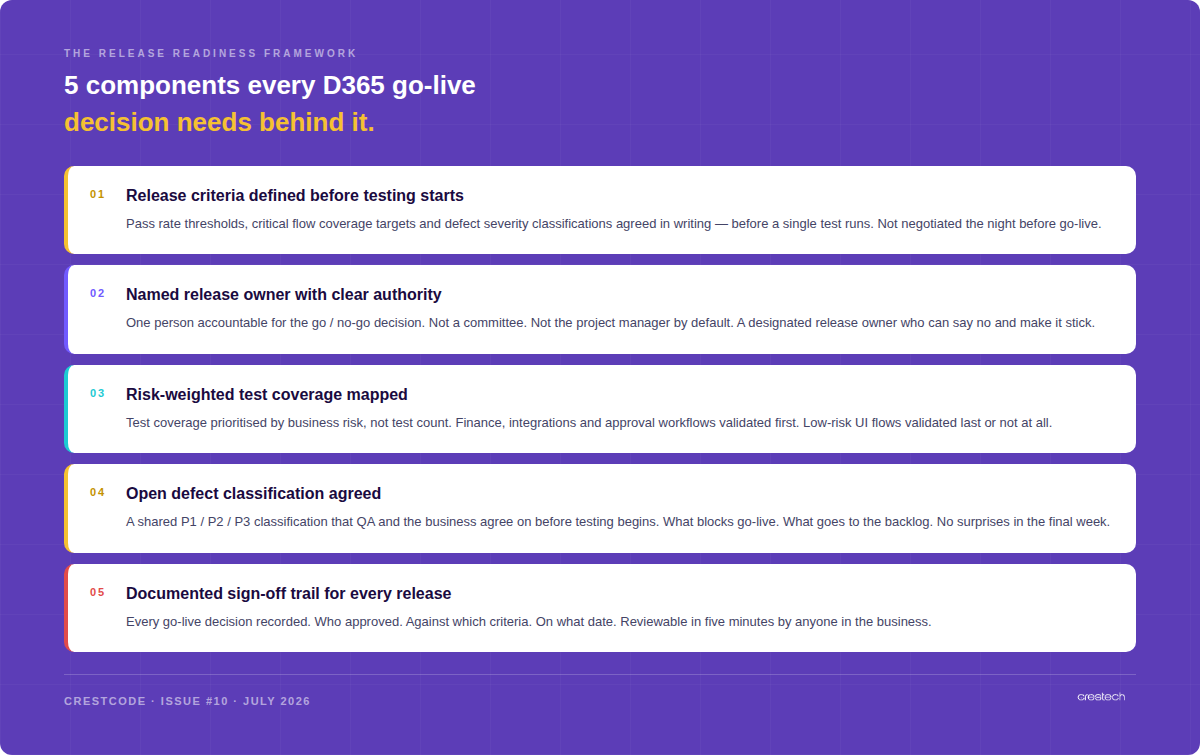
The 5-component release readiness framework

aaa

A release readiness framework does not need to be complex. It needs to answer five questions that most programmes leave unanswered until the week before go-live.

Component 01: Release criteria defined before testing starts. What percentage of tests must pass before a release is approved? What constitutes a critical flow? What defect severity classifications exist, and which ones block go-live? These decisions need to be made in writing, agreed between QA and the business, before a single script runs. Not negotiated under pressure the night before deployment.

Component 02: A named release owner with clear authority. Not a committee. Not the project manager by default. One person — named, accountable, and empowered to say no. The release owner’s job is not to make the date work. It is to make the decision correctly. That distinction matters enormously when a critical defect surfaces in the final week.

Component 03: Risk-weighted test coverage mapped. Test coverage prioritised by business risk, not test count. Finance processes, integrations, and approval workflows validated first and in full. Low-risk UI flows validated last or deferred to hypercare. The question is not how many tests ran — it is whether the right ones did.

Component 04: An agreed defect classification framework. A shared definition of P1, P2 and P3 that QA and the business have signed off on before testing begins. What blocks a release. What goes to the backlog with a documented risk decision. What gets fixed in hypercare. When this framework does not exist, every defect becomes a negotiation. And negotiations in the final week are always resolved in favour of the date.

Component 05: A documented sign-off trail for every release. Every go-live decision recorded. Who approved it. Against which criteria. On what date. Reviewable by anyone in the business in five minutes. This is not just governance hygiene — it is your protection when something goes wrong after go-live and the question becomes who signed off and on what basis.


When these decisions happen determines everything

The difference between a confident go-live and a painful one is not usually the quality of the testing. It is when the decisions that govern the testing were made.

Mature teams define their release criteria at programme kick-off. They name the release owner before the first test is written. They agree defect classifications in the planning phase, not the deployment phase.

Most teams do these things reactively — at the point of pressure, when the date is imminent and the stakes are highest. That is the worst possible moment to be making governance decisions for the first time.

Release readiness is not what you check on go-live day. It is what you build into the programme from day one.


What good looks like

aa

When a release readiness framework is working, you stop having the same stressful conversations before every deployment.

The go / no-go decision takes under thirty minutes — because the criteria were agreed upfront and the evidence against them is already documented.

The release owner can say no — and does, when the evidence requires it. The go-live date is a target, not an override mechanism.

Finance and operations have signed off separately from UAT, because their critical flows have been validated independently by people who understand the business risk, not just the test results.

Every open defect carries a documented risk decision — not just a status. A named person has reviewed it and signed off that it is acceptable to carry into production.

Post-release monitoring is planned before go-live. The hypercare plan exists. Escalation paths are named. The team knows exactly what to watch in the first seventy-two hours.


Closing thought

Go-live is a date on the calendar.

Release readiness is a decision you earn — through criteria defined upfront, ownership that is real, coverage that is risk-weighted, and sign-off that is documented.

The date will arrive whether you are ready or not.

The framework is what determines which of those two things is true.

Crestech helps D365 and ERP teams across the US and UK build release readiness frameworks, QA governance models and test automation programmes that hold. Subscribe to CrestCode for a new edition every Tuesday. DM to discuss your release readiness approach.

Your P2P Automation Proves It Runs. Not That the Money Is Right.

Execution and correctness are different tests. Here are the five places D365 Procure-to-Pay pays the wrong amount — and passes anyway.
Blog1

On Monday we shared a 60-second video of a Procure-to-Pay process running automatically in D365 — purchase requisition all the way through to payment validation, with no one clicking through screens.

It’s a good thing to watch. It’s also only half the picture.

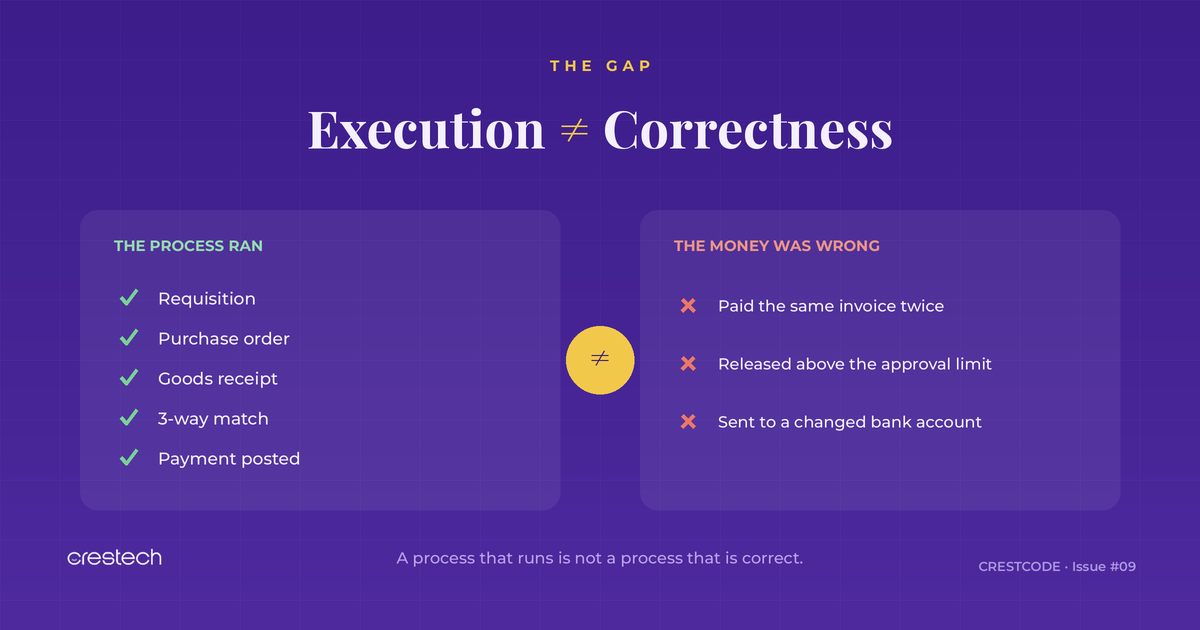
Because there’s a question automation is very good at answering, and a question it quietly leaves alone.

Automation answers: did every step run?

It doesn’t answer: was the result correct?

Those feel like the same question. In Procure-to-Pay, they are not.

A purchase order can be created, approved, received, matched, and paid — every step green — and the business can still lose money on that transaction. The process didn’t break. The outcome was just wrong.

Here are the five places it happens most.


1. The same invoice gets paid twice

A vendor emails an invoice. It gets keyed in. A week later the same invoice arrives through a different channel — maybe with a slightly different number, maybe posted to a different legal entity — and it gets keyed again. Two vendor invoices. Two payments.

Your automation validated that each invoice posted correctly. It did. Both of them. Functionally, nothing failed.

What to validate: duplicate detection across invoice number, amount, vendor, and date — including near-duplicates and cross-entity duplicates. Test that the system blocks or flags the second one, not just that the first one posts cleanly.


2. An order slips past the approval limit

Every organisation has approval thresholds — a manager can sign off up to one amount, a director up to another. Then someone splits a £90k order into two £45k orders. Or a change order pushes a PO past a limit after it was already approved.

Automation confirms the approval workflow ran. It rarely confirms the workflow ran against the right limit once the amount changed.

What to validate: that amount changes, split orders, and post-approval edits re-trigger the correct approval level — and that nothing releases above someone’s actual authority.

3. “Within tolerance” is not the same as “correct”

D365 matches PO, receipt, and invoice, and it allows a small tolerance so tiny price differences don’t block payment. That’s sensible. It’s also exploitable. An invoice priced just inside tolerance, repeated across hundreds of lines, adds up to real money.

Automation checks that matching ran and that within-tolerance invoices pass. That’s the design working as intended. The risk is treating “within tolerance” as if it means “right.”

What to validate: matching behaviour at the edges — at tolerance, just over, just under, with partial receipts, and with price changes between PO and invoice. And confirm the tolerances are set where finance actually wants them, not where they were left during setup.


4. The vendor’s bank details changed last week

This is the one that turns a testing gap into a fraud headline.

The PO is right. The invoice matches. Approvals are clean. Every test passes. But the vendor’s bank account was changed last week — by a legitimate update, or by someone who shouldn’t have been able to.

No functional test catches this, because functionally nothing is wrong. The payment goes exactly where the record says to send it. The record is the problem.

What to validate: the change controls around vendor master data — who can change bank details, whether those changes are reviewed, and whether a changed account triggers a hold before the next payment run.


5. The tax and currency look fine, and are wrong

Blog2

A wrong sales tax group. An exchange rate pulled from the wrong rate type or the wrong date. A cross-entity transaction posted in the wrong currency. Each one passes as a clean, complete transaction. Each one is wrong by a number nobody sees until reconciliation — or an audit.

Automation confirms the tax and currency fields are populated. It rarely confirms they are correct for that specific scenario.

What to validate: tax determination across vendor and item combinations, exchange-rate selection on cross-currency invoices, and intercompany postings — checked against expected values, not just “a value appeared in the field.”


The shift this is really asking for
Blog4

Notice the pattern. In all five, the process executed perfectly. Automation did its job. The defect lived in the outcome, not the steps.

That’s the difference between process validation and control validation.

Process validation asks: can the system complete Procure-to-Pay?

Control validation asks: does Procure-to-Pay protect the business while it does?

Most D365 test suites — automated or not — are heavy on the first and light on the second. That’s understandable. Steps are easy to script. Correctness is harder, because it needs you to know what the answer should be and to build the test around the money, not the clicks.


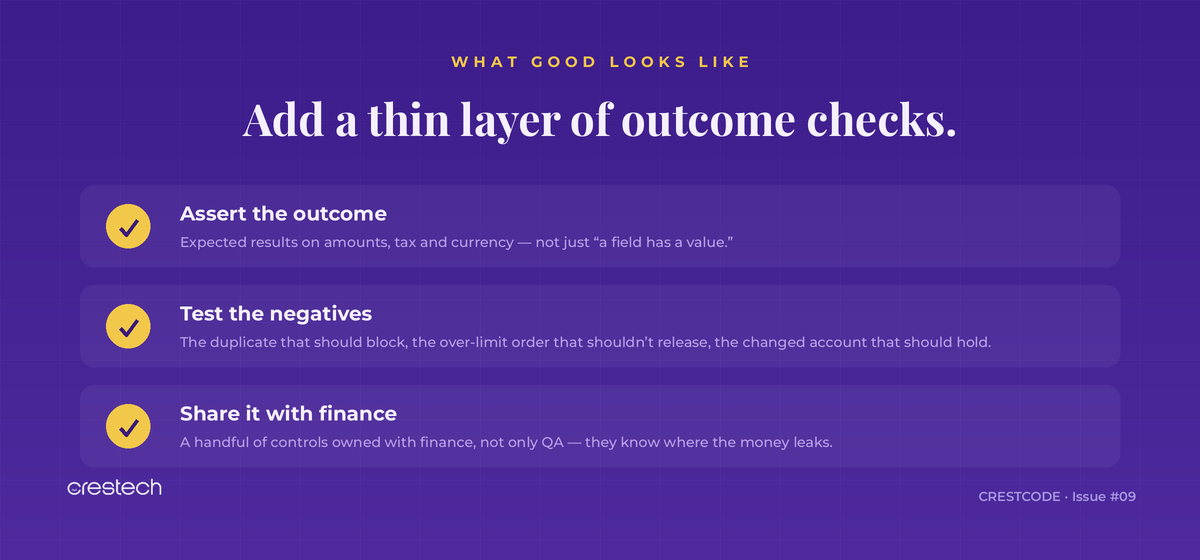
What good looks like

You don’t need to rebuild your suite. You need to add a thin layer of checks aimed at outcomes:
Blog5

Monday’s video ended at payment validation. This is what payment validation has to be worth.

Automating P2P is the easy win. Trusting it is the real one — and trust comes from testing whether the money is right, not just whether the process ran.


CRESTCODE lands every week with one practical idea for D365 and ERP testing teams. Subscribe to get the next edition.

And if your team is automating D365 testing and wants regression that validates outcomes — not just execution — that’s the work we do at Crestech

How to Cut Your D365 Regression Suite From 600 Tests to 80 — And Actually Improve Coverage.

Here is a question We ask every D365 QA team whome we work with.

If you had to remove 50% of your regression suite tomorrow — how would you decide what stays?

Most teams pause. Some say they’d keep the tests that run most often. Some say the ones that catch the most defects. A few admit they genuinely don’t know.

That pause is the problem.

If you don’t have a clear answer to that question, your regression suite isn’t protecting your releases. It’s just creating the feeling of protection.

This edition gives you the method. Not the observation — the actual, repeatable process that high-performing D365 QA teams use to run fewer tests, cover more risk, and release with confidence.


The Real Problem — Your Suite Is Getting Longer. Your Coverage Isn’t Getting Better.

asd

The instinct when something breaks in production is to add more tests. One more regression scenario. One more automated script. One more validation step.

Over time, this compounds. Suites that started at 80 scripts are now running 600. Execution cycles that took two days now take six. Maintenance that was manageable is now consuming entire sprints.

And yet — the production defect rate hasn’t moved.

The reason is straightforward. Most regression suites grow by addition, not by design. New tests are added for every new feature or incident. Old tests are almost never removed. And nobody stops to ask whether the scripts being added are covering the processes that actually matter.

The uncomfortable truth: a 98% pass rate on the wrong test cases tells you nothing about whether your next release is safe.


The 4-Step Method — How High-Performing D365 Teams Decide What to Test

adad

Step 01: Map your business risk. Before you open your test suite, open a spreadsheet. List every business process in your D365 environment that would cause financial or operational harm if it broke in production. Revenue posting, invoice matching, approval workflows, financial close, supply chain fulfilment. Rank them by impact. This is your risk register. Your test suite should be built around it — not the other way around.

Step 02: Identify what changed. Run a change impact assessment before every release. What did this Wave update touch? Which customisations were modified? Which hotfixes went in? Which configuration changes were made? The intersection of “changed this release” and “high business risk” defines your mandatory regression scope.

Step 03: Trace your integration dependencies. A change to a D365 Finance process rarely stays in Finance. It cascades into Supply Chain, Commerce, external reporting systems, and third-party connectors. Map the dependency chain before testing starts. Test the cascade, not just the trigger.

Step 04: Audit which scripts actually cover those risks. Cross-reference your test suite against everything you identified in Steps 01–03. Which scripts directly validate your high-risk, changed, integration-dependent processes? Those are your non-negotiable tests. Everything else is a candidate for removal, deferral, or deprioritisation.

This is the shift from volume-based to risk-based regression. It takes an afternoon to run for the first time. It gets faster with every release.


The 50% Cut Framework — How to Decide What Stays and What Goes

adsas

Plot every test case against two axes: how much did this area change in this release, and how high is the business risk if it fails?

The result is four categories — and a clear decision for each:

Must Test — Full: High risk AND high change impact. Every script in this zone runs. Non-negotiable. Block the release if failing.

Keep — Lite: High risk but unchanged this release. Run core path smoke tests. Full regression not required unless you detect environmental issues.

Watch — Selective: Area changed but business risk is manageable. Run a targeted subset. Flag for post-release monitoring. Re-evaluate the risk rating next cycle.

Retire or Defer: Nothing changed. Business impact is low. These scripts are consuming time and maintenance cost with near-zero protective value this cycle. Remove them from the active suite.

Most teams, when they run this exercise honestly, find that 40–60% of their active test suite falls into the Retire or Defer quadrant. That is the dead weight that has been making releases slower and more expensive without making them safer.


What Good Looks Like

aaa

The numbers above are not projections. They reflect what actually happens when teams make this shift — shorter cycles, higher critical flow coverage, fewer production defects, dramatically lower maintenance burden, and a QA team that goes into every go-live with genuine confidence rather than hope.

The reduction in test count is not a reduction in quality. It is a redefinition of what quality means — from running everything to protecting what matters.


Closing Thought

The best D365 QA teams are not the ones with the largest test suites.

They are the ones who can look at every test case in their suite and explain exactly what business risk it protects, what changed to trigger it this release, and what the consequence would be if it failed.

That clarity is what separates activity from assurance.

The question for this week: If you ran the 50% cut framework on your current regression suite — which quadrant would most of your tests fall into? Drop the number in the comments.

Crestech helps D365 and ERP teams across the US and UK build risk-based testing strategies, regression frameworks, and QA governance that actually protect releases. Subscribe to CrestCode for a new edition every Tuesday.

Your Regression Suite Is Probably Testing the Wrong Things

A few weeks ago we asked where D365 teams go after RSAT.

The conversations that came back surfaced a more uncomfortable question — one most teams haven’t answered yet:

What are you actually testing right now, and does it match what your business cannot afford to break?


Imagine This

Your team executes:

✅ 2,000 test cases

✅ 98% pass rate

✅ Release approved

Three days later:

❌ Customer orders fail

❌ Finance posting breaks

❌ Warehouse integrations stop working

What happened?

The answer is uncomfortable.

Your regression suite was working.

It was just testing the wrong things.


Quick Self-Check

How many of these can you confidently say yes to?

☐ We know which test cases protect revenue

☐ We know which test cases protect compliance

☐ We know which test cases protect customer experience

☐ We know which test cases protect integrations

If the answer is fewer than three — your suite is probably measuring volume, not risk.


Test Cases ≠ Coverage

The pattern we see most often in D365 environments:

Article content

What This Looks Like In Practice

A team we spoke with recently reported thousands of automated test cases. Strong number on a slide. Real confidence going into a release.

During that release, one business process failed.

A single end-to-end workflow — the one that generated revenue.

Why?

Because the suite heavily validated screens and field-level behaviour, but barely touched the workflow itself. Lots of clicks tested. Almost no business outcomes.

The issue wasn’t test volume.

It was test prioritisation.


The 3-Layer Coverage Model

A simple way to re-sort what you’re testing:

Layer 1 — Revenue Processes

Order-to-cash. Procure-to-pay. Invoice processing.

If these break, money stops moving. Always test. Always automate. Always validate after every Wave update.


Layer 2 — Operational Processes

Approvals. Inventory. Planning. Reporting.

Critical but not catastrophic if delayed. Test thoroughly, but the bar is lower than Layer 1.


Layer 3 — Everything Else

Useful. Worth testing. But not equally critical.

The mistake most D365 teams make is testing all three layers with the same intensity — which means Layer 1 gets the same attention as Layer 3, and the suite produces confidence that doesn’t match real risk.


The Question That Should Drive Your Strategy

Don’t ask:

How many test cases do we have?

Ask:

Which business processes can we not afford to break?

Those are rarely the same conversation.

And once you’ve answered the second question, the first one starts to matter less.


Where Crestech Sits in This

We work with D365 F&O teams on exactly this — re-sorting regression coverage so it maps to business risk, not screen count.

If your team is reviewing what to test (and what to stop testing) ahead of the next Wave, we’d happily spend 30 minutes walking through how other D365 teams are structuring it.

No pitch. Just a working conversation.


Found this useful? Share it with your QA lead, ERP manager or anyone reviewing Wave readiness. The “test count vs business risk” conversation is overdue across most D365 environments.


#Dynamics365 #D365FO #ERPTesting #RegressionTesting #QualityAssurance #MicrosoftDynamics #D365Community #WaveRelease #TestStrategy #CIO #CFO

Most D365 Teams Don’t Know What They’re Replacing

Last week we discussed what Microsoft’s “feature complete” announcement means for RSAT.

This week is about what comes next.

Because most teams make the same mistake.

They start evaluating replacement tools before they understand what they already have.

Before they know which scripts actually matter.

Before they know where coverage gaps exist.

Before they know what would break if RSAT disappeared tomorrow.

Before you evaluate a single replacement — answer these five questions about what you already have.

Not with a vendor demo.

Not with a tool comparison.

With an audit.


The Audit That Should Happen Before Anything Else

We have spoken to teams with hundreds of RSAT scripts who could not confidently explain which ones protect their most critical business processes.

That is not a tooling problem.

It is a visibility problem.


Step 1 — Count Your Scripts

How many RSAT scripts does your team currently maintain?

Under 50: Migration is usually manageable.

50–200: You need a structured plan.

Over 200: You need a strategy, ownership model and phased transition approach.

Most teams cannot answer this immediately.

That is already a signal.


Step 2 — Find Out When They Were Last Run

Pull the execution history.

If a script has not been executed in the last 90 days, ask why.

Inactive automation does not reduce risk.

It creates false confidence.


Step 3 — Map Scripts To Business Processes

Not all scripts are equal.

A financial close process carries different risk than a rarely used report.

Map every script to the business process it protects.

Then rank those processes by operational impact.

That ranking becomes your migration priority list.


Step 4 — Identify What RSAT Is Not Covering

RSAT validates what it can record.

It does not automatically cover:

— APIs

— Integrations

— Background batch processes

— Non-UI business logic

Every RSAT library contains gaps.

The question is whether you know where they are.


Step 5 — Evaluate Customisation Coverage

Standard Microsoft flows are one thing.

Customisations are another.

Many production incidents originate inside custom workflows, integrations, approval logic, finance mappings and business rules.

Most organisations discover that their highest risks sit inside the customisation layer.


What This Audit Reveals

After completing these five steps, most teams discover one of three things:


  1. They have fewer critical assets than expected.
  2. Their biggest risks sit outside existing coverage.
  3. Their challenge is not tool selection. It is preserving business knowledge.


That changes the migration conversation completely.


One Final Thought

Every month spent evaluating tools without understanding coverage makes migration harder.

The clock is the amount of undocumented regression knowledge still trapped inside your RSAT library.

Before you evaluate a replacement tool, understand what you are replacing.


If you have completed an audit and want a second perspective, reply directly.

No forms.

No sales process.

Just a conversation.


Crestech Software specialises in D365 F&O QA, regression automation, Wave validation and RSAT transition readiness.

366 days until May 15, 2027.

#Dynamics365 #D365FO #RSAT #ERPTesting #RegressionTesting #D365Com

Microsoft Called RSAT “Feature Complete.” What Does That Mean For D365 Teams?

If you have been running Dynamics 365 tests using RSAT, you have probably already seen the discussion. 

At a recent Microsoft TechTalk, one message stood out: 

RSAT is feature complete. 

No new capabilities. No future roadmap expansion. 

It continues to work today. 

But it is not moving into a new phase of investment. 

For many D365 QA leads and ERP managers, this was not entirely unexpected. 

RSAT always solved a very specific problem. 

The market evolved. Testing evolved. D365 environments evolved. 

RSAT largely stayed where it started. 

And now many teams are asking the question they postponed for years: 

What comes next? 


What RSAT Solved — And Where It Reached Its Limits 

RSAT was built around a real challenge. 

With D365 Finance & Operations and the One Version update model, testing became continuous. Businesses could no longer treat validation as a go-live activity. Wave updates made regression a recurring responsibility. 

RSAT became Microsoft’s answer: 

Record business tasks. Reuse Task Recorder assets. Automate validation. Connect with Azure DevOps. 

For standard scenarios — it worked. 

But D365 environments changed. 

Customisations expanded. Integrations increased. Business logic became deeper. 

And many teams discovered the same reality: 

Most RSAT libraries were not regression suites. They were collections of UI recordings. 

Every Wave update increased maintenance effort. Complex cross-functional scenarios remained difficult. Custom approval logic, modified finance mappings and bespoke integrations often sat outside meaningful coverage. 


What “Feature Complete” Actually Means 

  1. Current RSAT assets still work

Nothing breaks today. 

“Feature complete” does not mean immediate retirement. But it does mean future investment is limited. As D365 evolves, teams should evaluate how their coverage evolves alongside it. 

  1. Coverage gaps become more visible over time

New modules. New workflows. More integrations. More business rules. 

D365 environments continue growing. Testing expectations grow with them. 

The question becomes: will existing coverage scale with future requirements? 

  1. Future automation decisions matter more now

For teams still expanding RSAT usage in 2026, this becomes a strategic discussion. 

Not because RSAT disappears tomorrow. 

Because long-term regression planning now matters more. The automation choices made today influence future flexibility. 


What D365 Teams Are Doing Next 

Three approaches are becoming common: 

Path 1 — Low-code D365 testing platforms 

Many teams move toward low-code testing tools with reusable D365 assets, Azure DevOps integration, broader scenario support and faster maintenance. These platforms often reduce effort compared with traditional RSAT maintenance. 

The consideration: most still operate heavily at the UI layer. A tool that does not understand your custom approval workflow will still miss the same defects RSAT missed — just faster. Coverage quality depends on configuration, workflow understanding and business context. 

Path 2 — Custom automation frameworks 

Playwright. Selenium. SpecFlow. Maximum flexibility. Broader integration coverage. Deeper control. 

The trade-off: higher build effort, ongoing maintenance, stronger engineering dependency. Usually better suited for mature internal QA teams. 

Path 3 — Managed D365 QA approach 

Some organisations combine pre-built D365 assets, domain expertise, tool flexibility and business workflow understanding. 

The focus shifts from “Which tool do we buy?” to “What regression risk are we trying to reduce?” 

Because manufacturing procurement logic is different from retail fulfilment. Financial controls differ from distribution workflows. Context matters. 


The One Question That Decides Your Strategy 

Before selecting tools — ask this: 

How much of your regression risk sits inside customisations versus standard Microsoft flows? 

If risk lives mostly inside standard scenarios — a low-code platform may be enough. 

If risk sits in custom approvals, finance mappings, integrations, workflow exceptions and business rules built over years — then understanding those customisations becomes critical. 

Tools help. Business understanding completes the picture. 

This is the question RSAT was never really designed to answer. 

And it may become the most important question of the next D365 testing phase. 


Where Crestech Fits 

We are not a RSAT replacement tool. 

We help D365 teams understand existing coverage, customisation exposure, regression gaps, Wave readiness impact and future testing direction. 

Tools matter. Business logic matters more. 

If your team is reviewing what comes after RSAT, we are happy to have a practical discussion around what exists today, where risk concentrates and what a structured transition looks like. 

No pitch. No tool-first recommendation. Just a working conversation. 


If this was useful, share it with your QA lead, ERP manager or the team reviewing Wave readiness. 

The RSAT conversation is no longer about replacement. 

It is about regression strategy. 


#Dynamics365 #D365FO #RSAT #ERPTesting #RegressionTesting #MicrosoftDynamics #D365Community #QualityAssurance #WaveRelease #D365Testing #CIO #CFO 

Wave 1 Changed Retail D365. Has Your QA Plan Kept Up?

Wave 1 2026 is not a routine retail update.

This release introduces changes across inventory logic, commerce workflows, planning intelligence and credit processes.

For retail teams, that means something important:

The regression risk is no longer limited to what Microsoft shipped.

It sits inside your customisations. Your integrations. Your business rules.

Microsoft did not build those. And Microsoft did not test them.


What Retail Teams Should Review First


1. AI-Driven Picking & Inventory Rebalancing

Inventory movement logic is becoming more intelligent.

Good for operations.

Potentially risky for warehouse workflows, fulfilment sequences, allocation rules and custom inventory logic built on top of the standard framework.

The new AI picking engine interacts directly with how your warehouse is configured — not how Microsoft configured a warehouse in theory.

A legitimate order misrouted to the wrong fulfilment location because the new picking logic did not account for your custom slot rules is not a Microsoft problem. It is a regression gap.

Question: Does your regression strategy cover business behaviour — or only transactions?


2. Commerce Order Management Changes

Commerce routing and order handling continue evolving in Wave 1.

Retail environments with custom routing, fulfilment rules, external integrations or partner logic should review downstream dependencies, order flow validation and exception handling.

This is usually where silent failures appear.

Not during testing. During the first week of real orders.

A modified order management framework interacting with custom promotion logic or split fulfilment rules does not announce itself. It surfaces when a customer order does not arrive, or arrives wrong.

Question: Which of your order flows run through logic your team built — not logic Microsoft shipped?


3. Price-Demand Intelligence In Planning

Planning is becoming smarter.

Regression becomes harder.

New intelligence influences forecasts, inventory assumptions, replenishment behaviour and planning outputs in ways that standard UAT rarely captures.

Traditional testing validates whether a transaction completed. It does not validate whether a planning decision was correct.

Your safety stock calculation, supplier replenishment trigger and demand forecast — all of them are now influenced by price-demand correlation logic that did not exist in your environment last quarter.

Question: Has anyone validated your planning configuration against the new intelligence layer — or assumed it still works the same way?


4. B2B Credit Management Enhancements

Built-in credit functionality reduces manual effort.

It also introduces regression exposure around approval paths, exception rules, credit checks, customer blocks and finance workflows.

A legitimate wholesale order hitting an incorrect credit block is a customer relationship conversation nobody wants. That is what misconfigured credit management creates — and it is exactly the kind of silent failure that does not appear in a standard test run.

Finance teams should review credit check configurations, approval hierarchies and exception handling before production updates.

Question: If a wholesale account gets incorrectly blocked on their next order, will your team know why — before the customer calls?


Four Questions Every Retail Team Should Ask Before Wave Deployment

  1. What business logic sits outside standard Microsoft flows?
  2. Which integrations influence order fulfilment?
  3. What custom rules affect inventory decisions?
  4. What finance workflows change behaviour during exceptions?


If those questions are unanswered —

your regression suite is probably validating transactions, not operations.


Retail teams are entering Wave 1 with more intelligence built into planning, fulfilment, inventory movement and commerce processes than any previous release.

That also means more business logic sitting outside standard regression paths.

AI-driven inventory decisions, commerce updates, planning intelligence and credit workflows introduce change beyond what traditional UAT usually covers.

We are already seeing where the regression risk is concentrating in retail D365 environments.

If your team is reviewing Wave 1 readiness, we are happy to have a practical 30-minute discussion around your retail workflows, customisations, integrations and regression exposure.

No pitch. Just a working session.


Found this useful? Share it with your implementation partner or the IT lead managing your Wave rollout. This is a conversation retail teams should be having before production updates.


#Dynamics365 #D365FO #RetailTech #ERPTesting #RetailOperations #D365Retail #WaveRelease #D365Community #CIO #CFO #QualityAssurance #MicrosoftDynamics